
Voice, speakers and background noise
pma-voice and proximity voice
Section titled “pma-voice and proximity voice”Meridian carries radio audio itself, so it runs alongside pma-voice (or FiveM’s built-in voice) without replacing it. Players keep proximity voice as before. While they hold the radio key, nearby players also hear their side of the call through proximity voice, just as with pma-voice’s own radio.
To turn that off:
setr meridian_proximity "false"Keep pma-voice’s own radio unused, or rebind it, so players don’t end up on two radios. Its default key is Left Alt; Meridian’s push-to-talk defaults to Caps Lock.
Radio speakers
Section titled “Radio speakers”Radios play calls on their speaker, so players standing nearby hear the other side of the call too. It fades with
distance, comes from the direction of the radio, and is muffled through car bodies and walls. Players who don’t
carry a radio hear it as well. Each player can switch their own radio to an earpiece with /radiospeaker (or a key
bound to “Radio: speaker/earpiece”), and then only they hear it.
setr meridian_speaker "false" # radios are never heard by players nearbysetr meridian_speaker_range "12" # how far a radio on speaker carries, in metres (2-20, default 8)Radio speakers need the resource’s link to the radio server (on unless meridian_server_api is "false") and
OneSync, because the radio server works out who is near whom from player positions the game server reports every
second. Every player’s radio UI keeps a small receive-only connection to the radio server for it; audio is only
sent to a player while a radio near them is playing a call.
Earpiece clothing
Section titled “Earpiece clothing”You can make certain clothing count as an earpiece, such as an EUP earpiece prop. Set this up in the web app under System → Settings → Earpiece clothing. While a player wears one of these items, their radio switches to the earpiece. When they take it off, it goes back to their own choice. Tick Don’t allow the speaker while wearing one if you don’t want players switching back to the speaker while they wear it. Changes reach players straight away.
To find an item’s numbers, put it on in game and type /radioclothes. It prints every prop and clothing slot as
drawable/texture. Earpieces are usually the Ears prop. The male and female freemode peds use different
numbers, so add a row for each with Ped set to Male or Female. Leave the texture blank to match every color of
that item.
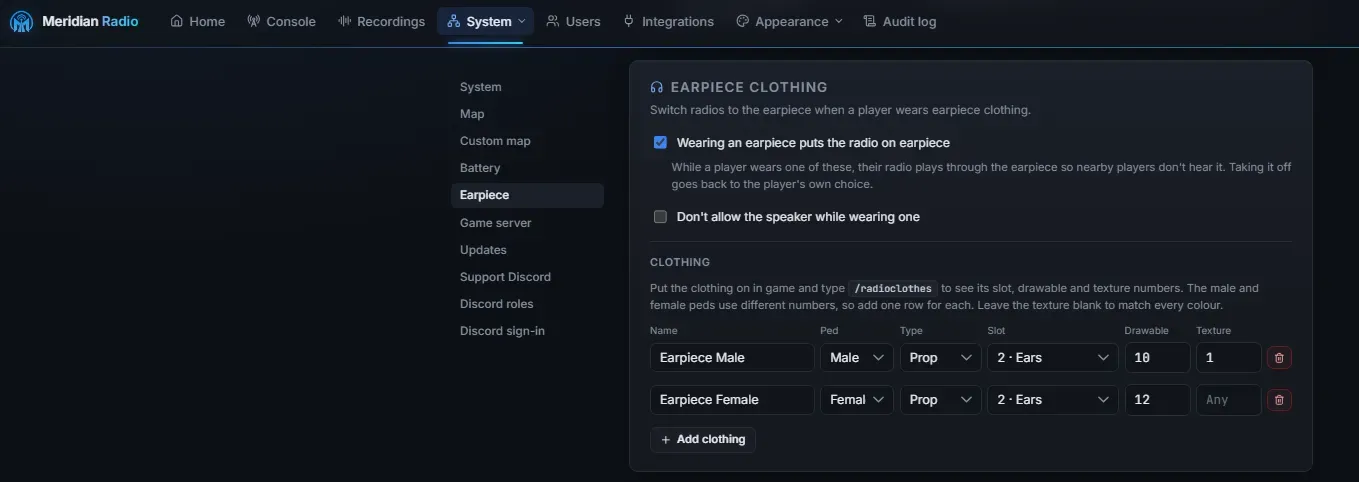

Male and Female rows only match the GTA Online freemode peds (mp_m_freemode_01 and mp_f_freemode_01). Rows set
to Any match whatever ped the player uses.
Background noise
Section titled “Background noise”While a player transmits, their radio’s microphone picks up what’s around them, and it’s heard behind their voice:
- sirens (their own vehicle’s, and others nearby)
- their engine and road noise, louder on motorcycles and quieter inside cars
- helicopter rotors, their own or nearby
- gunfire, theirs and nearby (suppressed weapons much quieter)
The sounds are made by the radio itself from what’s happening in the game, so there’s nothing to download.
setr meridian_ambient "false" # no background noisesetr meridian_ambient_level "50" # quieter background noise (0-100, default 100)Sirens from siren resources
Section titled “Sirens from siren resources”A siren is heard when the vehicle’s emergency lights are on, its siren sound is on, and someone is in the driver’s seat. Lights without the siren, and a car left with its lights on after the driver gets out, stay quiet.
Resources that control sirens themselves (lights-only modes, or their own siren tones with the game’s sound muted)
can tell the radio when a vehicle’s siren is actually sounding. Set the vehicle state bag meridianSiren to true
or false (or back to nil to let the game decide), from the driver’s client:
-- In your siren resource, when the tone starts or stopsexports.meridian:setSirenAudible(vehicle, true)exports.meridian:setSirenAudible(vehicle, false)
-- or the state bag directly (client or server)Entity(vehicle).state:set("meridianSiren", true, true)
If your siren resource always sets it, and you don’t want the game’s own siren state used at all:
setr meridian_siren_audio "statebag" # only vehicles with meridianSiren = true count as sirens (default "game")