
Phone calls and texts
Players can call dispatch from their in-game phone. They dial one of your community’s numbers, such as 911, and the call rings at the dispatch console. The dispatcher answers and talks to them like a real phone call. They can put the call on hold, transfer it to another console or line, or patch the caller onto a talkgroup so units hear them directly. Players can text the same numbers, and dispatchers can text back.
Phone calls need LB Phone on your game server. They work on every plan.
Setting up lines
Section titled “Setting up lines”As an admin, open System → Phone.
- Turn on Players can call and text dispatch.
- Under Lines, add the numbers players can dial. Each line has a Name that dispatchers see (like “911” or
“Non-emergency”) and a Number (digits,
*,#or+, up to 15). Use whatever emergency number your community’s region uses: 911, 112, 999, 000 and so on. Tick Texts for lines players can text. You can have up to 10 lines. - Choose how long a call rings before the caller hears that nobody answered (Ring for up to, 15 seconds to 10 minutes).
- Click Save changes in the bar at the bottom of the page.
Game servers pick up the changes straight away: the numbers start working on players’ phones without a restart.
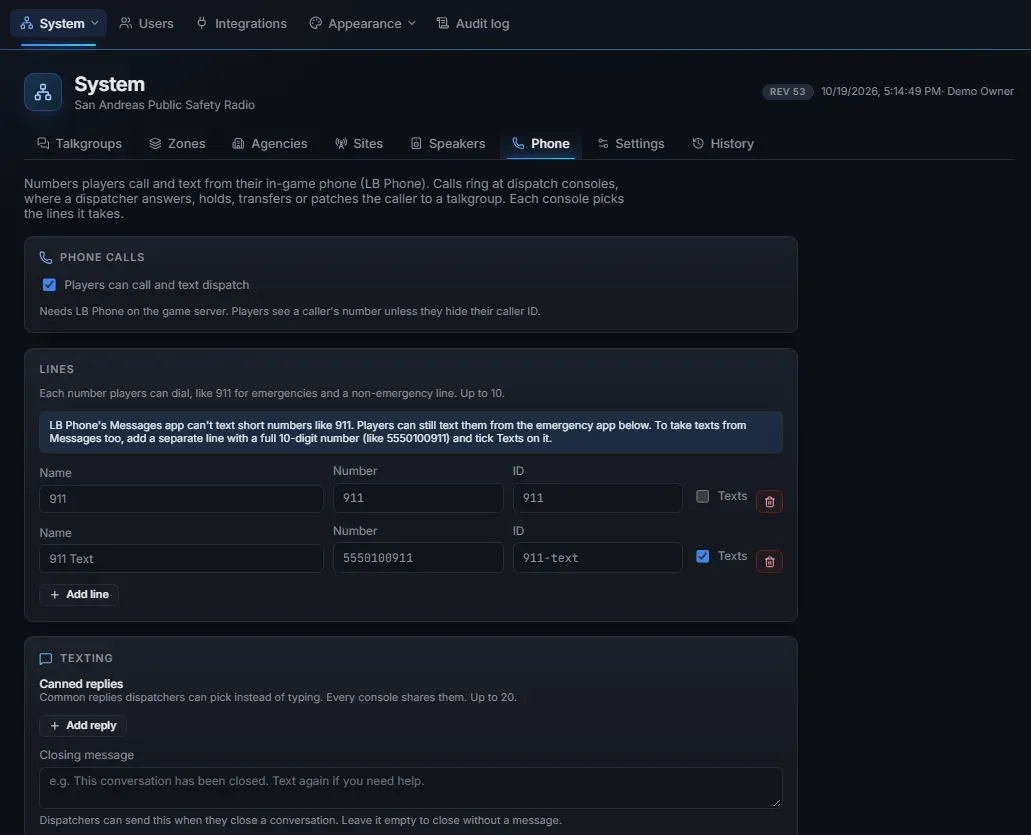
Each line also has an ID. Change it only before anything uses it.
Texting short numbers
Section titled “Texting short numbers”LB Phone’s Messages app can’t text short numbers like 911. Players can still text them from the
emergency app, which Meridian adds to their phone. If you also want texts from the Messages app,
add a second line with a full 10-digit number (like 5550100911), tick Texts on it, and tell players about it.
The Phone page points out any texting line that’s too short.
Canned replies and the closing message
Section titled “Canned replies and the closing message”Under Texting, add up to 20 canned replies: common replies dispatchers can pick instead of typing, like “Units are on the way. Stay somewhere safe.” Every console shares the same list.
The closing message is what dispatchers can send when they close a conversation, for example “This conversation has been closed. Text again if you need help.” Leave it empty to close without a message.
Alerting radios
Section titled “Alerting radios”Turn on Alert radios when nobody answers to page units when a call waits too long. Pick the talkgroups to alert,
the tone, and how many seconds to wait. Radios on those talkgroups play the tone and show the line’s name, for example
911 CALL.
If no open console takes the line, radios are alerted as soon as the call comes in, so a call is never left ringing unheard.
Recording calls
Section titled “Recording calls”Tick Record answered calls to record both sides of each call. It needs call recording turned on under System → Settings. Phone recordings sit with radio recordings under Recordings, shown as “Phone”, and are kept for the same number of days.
The emergency app
Section titled “The emergency app”Meridian comes with its own app for LB Phone. It lists your lines, each with a button that calls it through the phone, and a chat for the lines that take texts. Texts sent from the app go straight to dispatch, so they work for short numbers like 911. Dispatch’s replies show up in the app’s chat, with a phone notification when the app is closed.
Installing it
Section titled “Installing it”The download has a second folder, meridian_phoneapp, beside meridian. Put it in your server’s resources folder and
start it after Meridian in server.cfg:
ensure meridianensure meridian_phoneappIt needs LB Phone, and starts after it automatically. Leave it out if you don’t use LB Phone.
Designing it
Section titled “Designing it”Under Emergency app on System → Phone:
- Tick Add the app to players’ phones.
- Give it a name (shown under its icon), an icon and a colour. It’s called “Emergency” until you change it. The colour is used for the icon on the home screen and inside the app. To use your own image instead, upload a custom icon (a square PNG, JPEG or WebP, around 256×256): it replaces the built-in one on the home screen and inside the app. Players’ games load it from your radio server.
- Write the heading and intro players see when they open it, and the labels on its call and message buttons.
- Under Lines in the app, tick the lines it lists. Each can have its own label, like “Police, Fire & EMS”; leave it empty to show the line’s name.
- Click Save changes in the bar at the bottom of the page.
The preview beside the form shows how it will look. Players get the app, and any changes to it, straight away: no
restart needed. Untick Add the app to players’ phones to remove it from every phone. If the app is on but
meridian_phoneapp isn’t started, the game server’s console says so.
A player’s chat in the app shows their texts with each line from the last week. Replies never show the dispatcher’s name in the app.
The game server
Section titled “The game server”The resource uses LB Phone automatically when it’s running. To choose yourself, set meridian_phone in server.cfg:
set meridian_phone "auto" # the default: use LB Phone when it's runningset meridian_phone "lb-phone" # always LB Phoneset meridian_phone "off" # no phone calls or texts to dispatchYour lines show up in LB Phone as numbers players can dial. The caller’s voice goes to the radio server directly from their game, like the radio, so nothing else needs setting up.
Taking calls at the console
Section titled “Taking calls at the console”When your system has phone lines, the console shows a Phone panel under Emergencies.
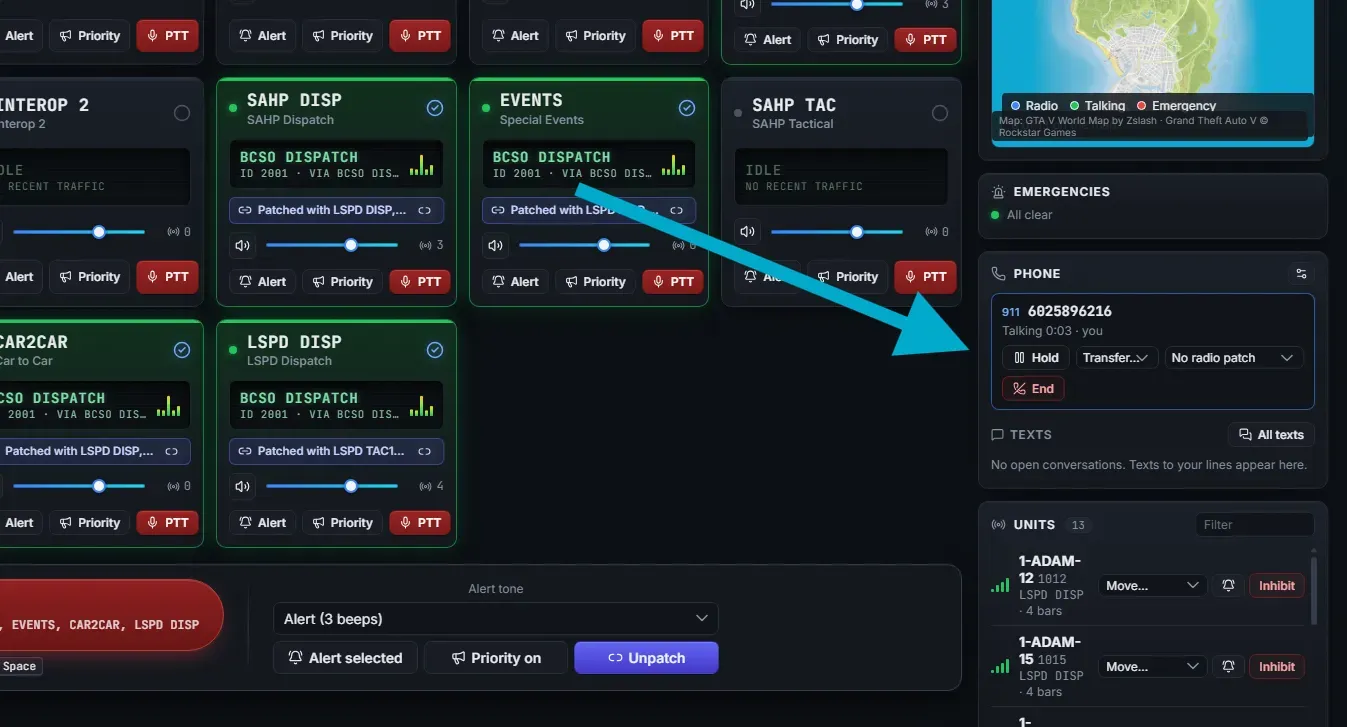
- Choosing lines. Click the settings button in the panel’s header to pick which lines ring at this console. A console takes every line until you choose. Each dispatcher’s choice is saved in their browser.
- Answering. A ringing call pulses green and the console rings. Click Answer to take it. Your microphone goes to the caller for as long as the call is active: you don’t need to hold anything to talk.
- Caller ID. The panel shows the caller’s phone number. Players who hide their caller ID in LB Phone show as “Private number”.
- Hold. Hold puts the caller on hold: they hear a beep every few seconds. Answering another call puts your current one on hold automatically, so you can juggle several. Resume takes it back.
- Transfer. Send the call to another open console, which then rings for it, or to another line, where it rings at every console that takes that line.
- Patching to radio. Choose Patch to and a talkgroup. The caller then hears that talkgroup’s traffic, and whenever they speak, units on the talkgroup hear them as if they were on the radio. You can keep talking to the caller from the console as normal. Choose No radio patch to stop.
- Talking on the radio during a call. Press the talkgroup PTT or the speaker PA as usual. While you hold it, your microphone goes there instead of to the caller.
- End hangs up. Reject ends a call that’s still ringing.
If a dispatcher closes their console with calls on hold, those calls go back to ringing on their line, so nobody is left on hold forever. Answering, transferring, patching and ending calls are recorded in the audit log.
Radio while you’re on a call
Section titled “Radio while you’re on a call”Click the Preferences button (the person with a cog) at the top right of the console to choose what radio traffic does while you talk on a phone call: Leave it, Lower it (to a volume you pick) or Mute it. It goes back to normal when you hang up or put the call on hold. Alert and emergency tones always play. Preferences are saved to your account, so they follow you to any console you sign in to.
The Phone panel lists open conversations on your lines, with an unread count. Click one, or All texts, to open the texts window:
- Active and Closed tabs list conversations by the player’s number, newest first.
- Pick a conversation to read it and reply. Canned… fills the reply box with one of your community’s canned replies, which you can edit before sending.
- Close takes a finished conversation off the active list. Tick Send closing message to text the player your community’s closing message as you close it. A new text from either side reopens it, and Reopen brings it back by hand.
- New text starts a conversation with a player’s number. You can also text the caller during a call with the message button on the call.
Replies reach the player where they texted from: the emergency app’s chat or LB Phone’s Messages app. Every console sees every reply, with the name of the dispatcher who sent it. Texts are kept for 30 days, and the console shows the last week of conversations. Closing and reopening are recorded in the audit log.
Players can send up to 10 texts a minute. A message with only a photo or location shows as “(sent an attachment)”.
Scripts
Section titled “Scripts”exports.meridian:getPhoneLines() on the server returns the current lines: { id, number, name, texting }, or an
empty list when phone calls are off.